How To Unlink Compressor Channels For Wider Mixes
Nail The Mix Staff
Before you reach for a stereo widener and potentially wreck your phase correlation, look at your bus compressor. Specifically, look at the Link parameter.
Most producers slap a stereo compressor on their mix bus or drum bus and assume the default settings are fine. But standard stereo linking sums the left and right channels into a single sidechain detector. If you have a massive floor tom hit on the right, the compressor clamps down on the left channel just as hard, even if there’s nothing loud happening there. The result? A narrower, less dynamic stereo image.
Here is why unlinking your compressor channels—or running “Dual Mono”—might be the easiest width hack you’re ignoring.
The Problem With 100% Stereo Linking
When a compressor is 100% linked, it applies the exact same gain reduction to both channels based on the louder of the two signals (or a sum of both). This is great for keeping the center image (kick, snare, vocals) rock solid, but it can suffocate the sides.
On a heavy drum bus, this is a common issue. Let’s say you have a floor tom panned hard right. When the drummer lays into it, a linked compressor will duck the entire drum bus. That means your crash cymbal or hi-hat on the left side gets squashed just because the tom on the right was loud. You lose the independent movement of the kit pieces, making the drums sound small and two-dimensional.
The Solution: Independent L/R Compression
By setting your compressor’s channels to independent (unlinked), the left and right sides react only to their own signal.
- On the Drum Bus: That floor tom on the right will trigger compression only on the right channel. The left channel stays open, letting the cymbals and room mics breathe. This creates a massive sense of space and separation.
- On the Mix Bus: In a dynamic metal arrangement, you might have a rhythm guitar chugging on the left while a lead line soars on the right. If your bus compressor is fully linked, the chugs will pump the lead guitar. Unlinking them allows the lead to soar without being dragged down by the rhythm section’s transients.
Because the gain reduction is slightly different on each side, you introduce subtle differences in volume between the left and right speakers. Our ears perceive these differences as enhanced stereo width.
How to Dial It In (Using the API 2500)
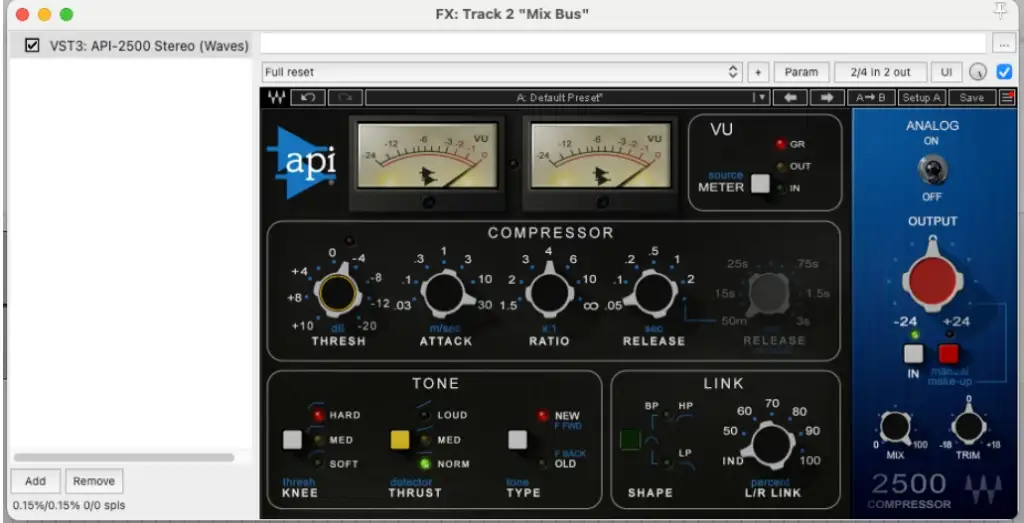
Not every compressor plugin has a variable link feature, but the API 2500 is the king of this technique. Looking at the Waves API 2500 interface, you’ll see a specific section dedicated to this in the bottom right corner labeled LINK.
Most compressors are a simple binary: linked or unlinked. The API 2500 is special because it offers a percentage knob for the L/R Link.
- Locate the LINK Section: It’s right next to the Output section.
- Adjust the L/R LINK Knob:
- 100%: Fully linked. Traditional stereo compression.
- 0% (IND): Fully independent. This is effectively dual mono. The left and right channels are completely separate.
- The Sweet Spot (50-70%): This is where the magic happens on a mix bus. You get enough linking to prevent the center image (kick/snare/vocal) from drifting to the side, but enough independence to let the heavy guitars on the sides breathe separately.
- Check Your Filters: The API 2500 also creates a sidechain filter (HP, LP, BP). Engaging the HP (High Pass) filter in the Link section prevents heavy low-end information (which is usually centered) from triggering the link circuit as aggressively.
If you aren’t using the API 2500, check your DAW. In Pro Tools, for example, you can load almost any plugin as “Multi-Mono” rather than “Multichannel.” This unlinks the controls and detectors, essentially giving you two separate compressors on one track.
When to Be Careful
While unlinking adds width, going 100% independent on the master bus can sometimes cause the center image to wander. If a loud guitar solo happens on the right, and the right channel compresses 3dB more than the left, your center-panned kick drum and vocals might momentarily drift to the left.
This is why the variable link on units like the API 2500 is so powerful. Setting it to 70% is often the “set and forget” setting for modern metal mixes—keeping the punch centered while letting the width explode.
Ready to hear the difference?
Theory is great, but hearing a pro implement this in a dense mix is where it clicks. At Nail The Mix, you can watch the world’s best metal producers pull apart their sessions and explain exactly how they treat their bus compression to get that wall-of-sound width.
Click here to get access to real multi-tracks and start mixing like a pro.