
How To Stop Mix Bus Pumping: The Sidechain Filter Hack
Nail The Mix Staff
You’ve spent hours carving out the perfect relationship between your kick and bass. The low end is thumping, the transients are cutting, and everything feels massive. Then, you slap your favorite SSL-style compressor on the master bus to get that coveted “glue,” and suddenly, the life gets sucked out of your track.
Every time the kick drum hits, the cymbals duck, the guitars wobble, and your mix feels like it’s gasping for air. This is the dreaded “pumping” effect, and in heavy metal mixing, it’s a track killer.
If you’re chasing punchy, modern metal mixes, you don’t need to ditch the compressor. You just need to stop it from reacting to the wrong things.
The Problem: Low End Energy
To understand why your mix bus is pumping, you have to look at how compressors “hear” audio. Low frequencies (like your kick drum and sub-bass) carry significantly more energy than high frequencies. Even if your kick and snare peak at the same level on a meter, the kick drives the detection circuit much harder.
When a massive double-kick pattern rolls in, that low-end energy slams into the compressor’s threshold first. The compressor clamps down on the entire signal—including your guitars, vocals, and overheads—just because the kick was too loud in the detector. The result? You lose your transient impact, and the mix starts to “pump” rhythmically with the kick drum.
The Fix: The Internal Sidechain High Pass
The solution isn’t to compress less; it’s to change what the compressor listens to. This is where the Sidechain High Pass Filter (SC HPF) comes into play.
Most modern VSTs have an “Internal Sidechain” or “Detector” section. When you engage a high-pass filter here, you are telling the compressor: “Ignore everything below this frequency.”
It is crucial to understand that this does not EQ your audio.
- Audio Path: The sound you hear. This remains full-range. The low end still gets compressed.
- Sidechain (Detector) Path: The signal the compressor analyzes to decide when to clamp down.
By rolling off the low end in the detector (usually everything below 60Hz to 100Hz), the massive energy of the kick drum passes through the detector without triggering the threshold as aggressively. The compressor starts reacting to the snare crack, the vocal presence, and the guitar wall—the “meat” of the track—rather than just the subs.
Dialing It In: Specific Settings & Plugins
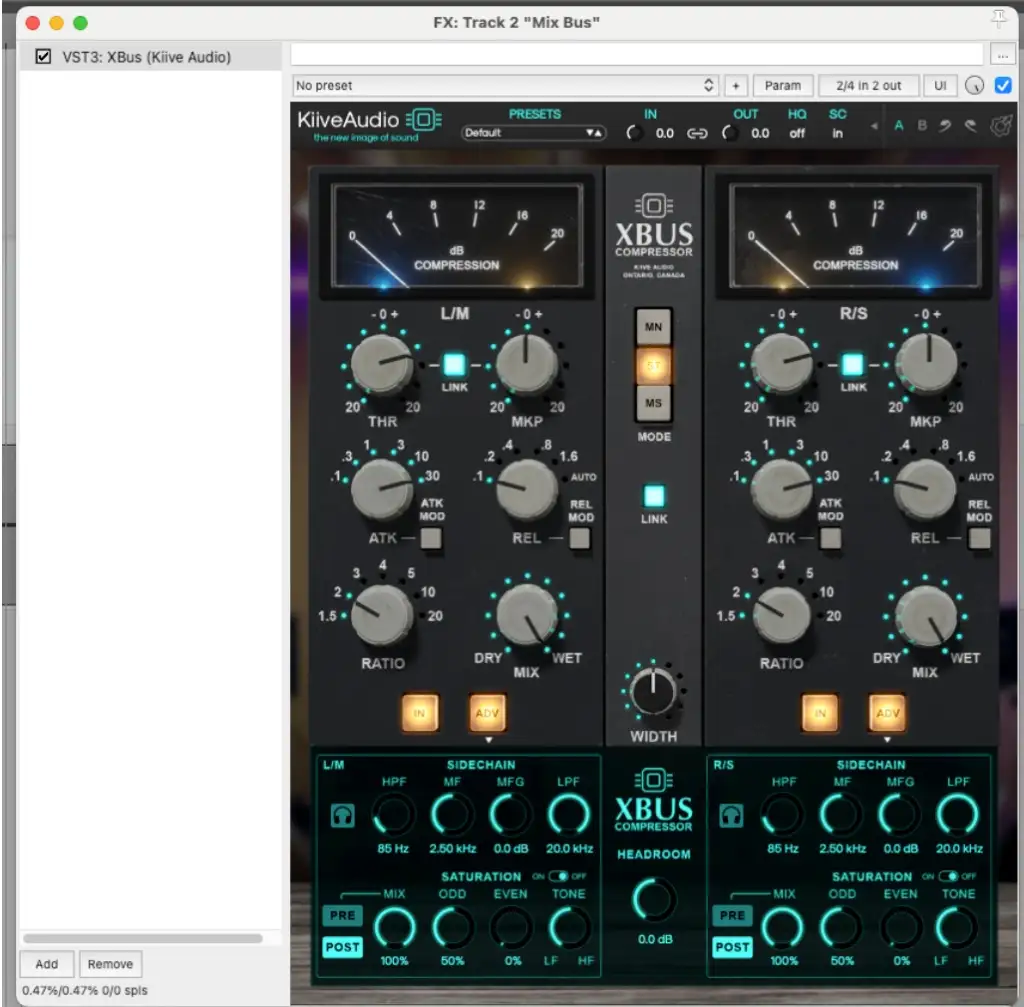
Let’s look at a practical example using the Kiive Audio X-Bus, which is modeled after robust VCA hardware units.
If you look at the bottom section of the plugin interface (as seen in the provided image), you’ll see a section labeled SIDECHAIN.
Here is a solid starting point for most heavy mixes:
- Locate the HPF Knob: In the Kiive X-Bus, it’s right there in the Sidechain section.
- Set the Frequency: In the screenshot, the HPF is set to 85 Hz. This is a sweet spot for metal. It filters out the sub-bass and the fundamental thump of the kick from the detector.
- Result: The compressor ignores the sub-lows. Now, when the kick hits, the needle doesn’t bury itself. You get the “glue” and cohesion on the mids and highs, while the low end passes through freely, retaining its massive size and punch.
While not every vintage hardware emulation includes this (since the original consoles didn’t always have it), most top-tier “in the box” options have added this feature because it’s indispensable for modern loudness.
- Brainworx bx_townhouse Buss Compressor: Look for the screw head or knob usually labeled “HP SC.”
- UAD SSL G-Bus Compressor: Often hidden in a drop-down or “features” menu, but essential for that classic desk sound without the pumping.
- Cytomics The Glue: There is a dedicated “Sidechain” section where you can dial the EQ knob to cut the lows.
Why It Matters for Metal
In genres like pop or jazz, a little mix bus breathing can be musical. In metal, where the kick drum is often triggering 16th notes at 200 BPM, pumping is unacceptable. It destroys clarity.
By using the sidechain filter, you effectively decouple your low-end transients from your gain reduction. Your kick can be the loudest thing in the mix, anchoring the track, while your mix bus compressor gently tightens the guitars and snare without having a panic attack every time the drummer hits the beater. For an even more radical routing-based approach to this problem, see how Machine splits the entire mix into separate Insides and Outsides buses to achieve extreme compression without low-end pumping.
Ready to level up your mixes?
Understanding the detection circuit is just one piece of the puzzle. If you want to see exactly how the world’s best producers manage their mix bus chain, handle low-end management, and glue massive metal tracks together, check out Nail The Mix.
You’ll get access to raw multi-tracks from the biggest bands in the world and watch live as top-tier pros mix them from scratch, showing you every knob move and plugin setting in real-time.