What’s the Best Doubler Plugin for Huge Metal Guitars?
Nail The Mix Staff
You know the sound. It’s that wall of guitars that feels a mile wide. It’s the vocal that sits perfectly in the middle but has this epic space around it. In modern metal, width isn’t a luxury; it’s a necessity.
The undisputed way to get this width is by tracking multiple, tight performances. A real quad-tracked rhythm section is the gold standard for a reason. But let’s be real, you don’t always have that option. Maybe you’re working with a single DI from a client, or you want to add a specific stereo texture to a lead vocal without eating up headroom with a washy reverb.
That’s where doubler plugins come in. But here’s the thing about plugins: it’s less about which one you have and more about how you use it. A monster plugin in the wrong hands will still sound weak, while a pro can make a stock plugin sound massive. The real magic is in the decisions you make.
Let’s break down some of the best doubler plugins for metal producers and, more importantly, how to actually use them to get killer results.
The Best Doubler Plugins for Metal Producers
When you’re looking for a doubler, you’re looking for a tool that can create width and separation without turning your mix into a phasey, muddy mess. Here are a few that consistently get the job done in heavy mixes.
Soundtoys MicroShift – The Modern Classic
If you see a pro using a doubler plugin, there’s a good chance it’s Soundtoys MicroShift. It’s modeled on the classic detuning tricks from the legendary Eventide H3000 and AMS DMX 15-80s hardware units, which are responsible for the massive vocal and guitar sounds on countless records.
Why it’s great for metal: MicroShift excels at creating width that feels clean and controlled. It doesn’t have the washy, smeary artifacts that some cheaper chorus or doubler effects can introduce, which is crucial for maintaining the percussive attack of heavy guitar chugs. It’s perfect for adding subtle width to a lead guitar, making a mono synth pad feel huge, or giving a lead vocal that radio-ready presence.
Actionable Tip:
Don’t just slap it on the track. Use MicroShift on an aux send. This gives you way more control. For guitars or aggressive vocals, try “Style I” and use the “Focus” knob. By turning the Focus frequency up to around 300Hz-500Hz, you’re essentially telling the plugin to only apply the widening effect to the frequencies above that point. This keeps the fundamental punch and low-mid power of your sound locked in the center and avoids creating mud.

Waves Doubler – The Old School Workhorse
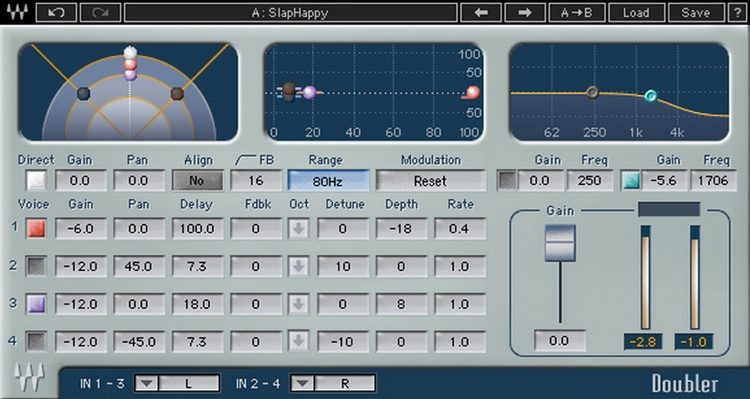
Waves Doubler has been around forever, and for good reason. It’s simple, effective, and light on the CPU. While it might not have the fancy GUI or the specific hardware emulation of MicroShift, it’s a straightforward tool for creating classic doubling effects.
Why it’s great for metal: It’s fast. You can quickly dial in a classic vocal spread or widen a guitar solo without overthinking it. It’s the sound of countless 80s and 90s metal records. If you want that classic Ozzy or Megadeth-style wide vocal effect, this is a great starting point.
Actionable Tip:
For a classic lead guitar or vocal spread, use the 2-Voice version. Pan the two generated voices hard left and right. Set the Detune on one voice to around -8 cents and the other to +8 cents. Use a small amount of Pre-delay (10-20ms) to create a bit of slap and separation from the dry signal in the center. Be careful not to overdo the detuning, or it will start to sound like a cheesy chorus pedal.
iZotope Vocal Doubler – The Best Free Option
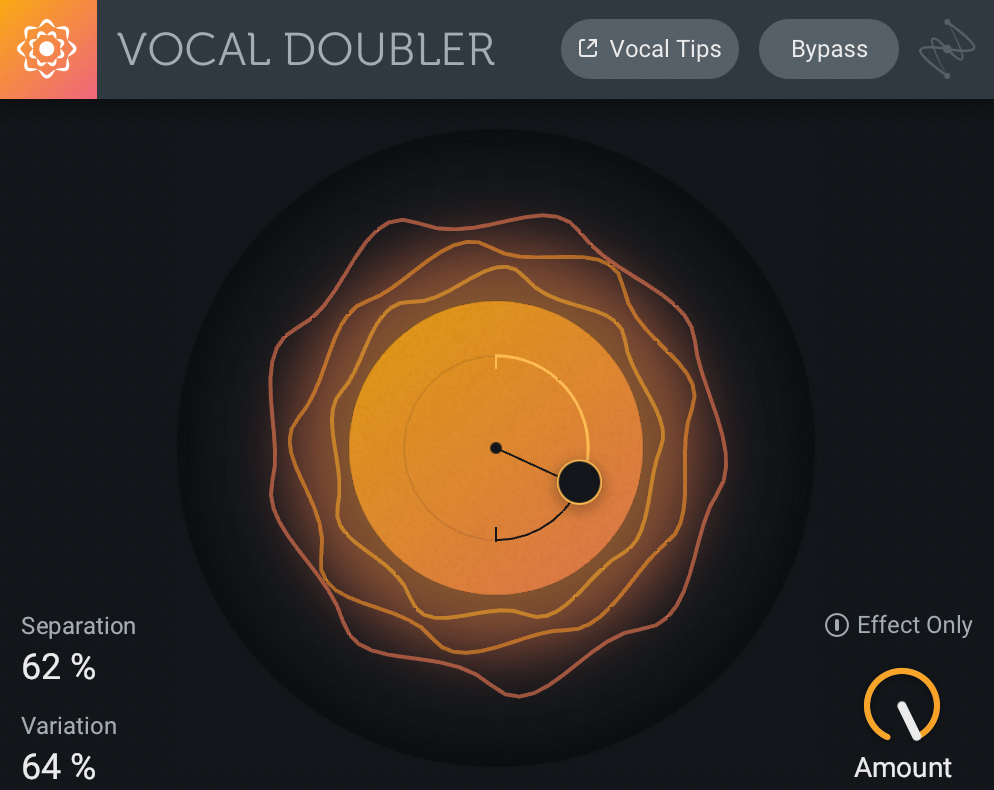
Yes, a free plugin can absolutely hang with the paid ones. iZotope’s Vocal Doubler is proof. It uses tech from their high-end Nectar and Ozone suites and boils it down to an incredibly simple, effective interface.
Why it’s great for metal: It’s a no-brainer. It costs nothing, sounds fantastic, and the “Humanize” function adds slight timing and pitch variations to make the doubles sound less static and robotic. This is awesome for creating backing vocal pads that sit nicely behind a main vocal without sounding fake.
Actionable Tip:
The interactive “puck” interface is surprisingly powerful. Dragging it up and down controls the separation (a mix of delay and detune), while left and right controls the stereo width. For a subtle effect on rhythm guitars, try keeping the separation low and the width high. For vocals, a little more separation can help them stand out.
Wait, Is a Free Plugin Really Good Enough?
Absolutely. This gets to the heart of a bigger concept: your skills matter infinitely more than your tools. Plugin Acquisition Syndrome is a real thing, and it’s easy to think the next purchase will fix your mixes. It won’t.
An expert producer like Joey Sturgis or Will Putney could get a world-class mix using iZotope’s free doubler (or even a stock DAW delay) because they know what they’re trying to achieve. They understand phase, EQ, and how to create space. They’re not just turning knobs; they’re making decisions. The plugin is just the vehicle for that decision. Getting hung up on whether you should use the Waves version or the Soundtoys version is missing the forest for the trees.
The DIY Doubler: The Haas Effect & Beyond
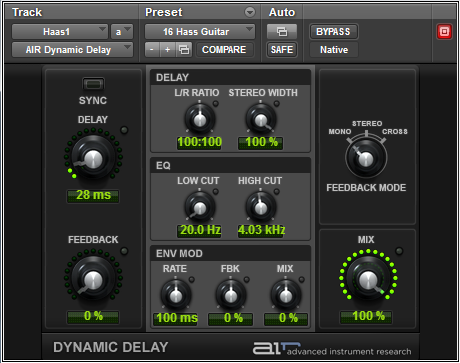
You don’t even need a dedicated “doubler” plugin to create width. The foundational technique is called the Haas Effect, and you can do it with any stock stereo delay plugin.
How to Do It (The Safe Way)
The basic Haas effect is just a single track panned to one side with a short delay of the same signal panned to the other. But doing it that way on the track insert can lead to serious phase problems, especially in mono. Here’s a much safer way to do it on an aux send:
- Create an Aux Track: Send the signal you want to widen (e.g., a lead guitar) to a new stereo aux track.
- Add a Stereo Delay: Put your DAW’s stock stereo delay on the aux track.
- Tweak the Settings:
- Set the mix/wet control to 100%.
- Set the feedback to 0%.
- Unlink the left and right delay times.
- Set the left side to 0ms delay (or as low as it can go).
- Set the right side to a short delay time, somewhere between 15-30ms.
- The Crucial Step for Metal: Put an EQ after the delay plugin on the same aux track. High-pass it aggressively. Start with the filter around 200Hz and push it up until the low-end smear is gone. For palm-muted guitars, you might need to high-pass as high as 500-800Hz to keep the chugs tight.
This high-pass filter is the key to using this trick in a heavy mix. It creates width in the mids and highs without destroying the mono punch of your low end.
Advanced Doubling: Beyond Just Width
Once you’ve mastered the basics, you can start combining techniques for more complex and unique tones.
Using Amp Sims for “Re-Amp Doubles”
This is a killer trick for a single DI guitar track. Instead of using a delay-based doubler, treat it like a real double.
- Duplicate your mono DI track.
- Pan the original hard left and the duplicate hard right.
- On the duplicate track, use a different amp sim, or even just different settings on the same sim. For instance, if your main tone is a Peavey 5150 amp sim, try a Mesa/Boogie Rectifier sim on the double. Or just use a different cab IR.
- This creates a much more authentic-sounding stereo spread because the two sides have genuinely different tonal characteristics, just like two separate performances would.
For more on getting these tones to sit together, check out our guide to EQing modern metal guitars for max impact.

Combining Doublers with Other Effects
Your effect chain doesn’t have to stop at the doubler. Try sending the output of your doubler aux to another effect. A great combo is sending your widened signal to a parallel compression bus. This can take a subtle, wide vocal and make it more aggressive and sustained without losing the stereo image. It’s a great way to add energy and character.
You can learn more advanced bus processing techniques on our metal compression secrets hub page.
The Verdict: It’s Not the Plugin, It’s the Producer
So, what’s the best doubler plugin? The one that you can use to get the sound you hear in your head. MicroShift is an industry-standard for a reason, Waves Doubler is a classic workhorse, and the DIY method is incredibly powerful.
But the tool itself isn’t the answer. Your mix won’t get better by collecting more plugins. It will get better when you deepen your understanding of the fundamentals. The choices you make with EQ, compression, and stereo placement are what separate amateur mixes from pro productions. The top-tier producers you see on Nail The Mix aren’t great because they have a secret plugin; they’re great because they have thousands of hours of experience making critical decisions.
If you’re ready to stop chasing the next shiny plugin and want to learn the decision-making process from the best in the business, you need to see how they work in a real session. Check out the Nail The Mix sessions catalog to watch world-class producers like Jens Bogren, Nolly Getgood, and Andrew Wade mix real songs from bands like Gojira, Periphery, and A Day To Remember, explaining every plugin, every setting, and every single decision along the way.