The Best Free Stereo Widener Plugins for Massive Metal Mixes
Nail The Mix Staff
Every metal producer is on the same quest: to forge a mix that sounds absolutely massive. You want guitars that feel like they’re wrapping around the listener’s head and a soundscape so wide it feels like you’re standing in the room with the band.
But getting that width isn’t as simple as slapping a plugin on your master bus and cranking a “WIDE” knob to 11. Do that, and you’re more likely to end up with a hollow, phasey mess that completely falls apart in mono than a powerful, professional-sounding track.
The truth is, true width comes from smart arrangement, hard panning, and surgical EQ. But when you’ve got those fundamentals down, a good stereo widener can be the final touch that pushes your mix from “big” to “epic.” Here are the best free stereo widener plugins that are actually worth your time, and—more importantly—how to use them without wrecking your mix.
Ditch the Plugin GAS, Master the Fundamentals
Before we even look at plugins, let’s get one thing straight. Plugin Acquisition Syndrome is real. It’s easy to think the next shiny VST is the missing piece of the puzzle. But the reality is that mixers like Jens Bogren, Nolly Getgood, or Will Putney could get a killer mix using mostly stock plugins.
Why? Because they’ve mastered the fundamentals. Their mixes are good because they know what they’re doing, not because of the specific brand of EQ they use. The real magic is in the decisions—how you choose to pan, EQ, and arrange your tracks.
A stereo widener is a specialized tool, a bit like oeksound’s Soothe is for taming harshness. You use it for a specific purpose. Just remember that every plugin you add introduces a tiny bit of latency and alters the phase relationship of your audio. This is especially critical in parallel processing, where misaligned signals can cause nasty comb filtering. A DAW like Pro Tools used to be notoriously bad with this, which is why you see a lot of older mixes with very little parallel busing.
The point is, the tool should work for you. If a plugin’s GUI is confusing or it slows you down, don’t use it. Use the widener that makes sense to your brain and allows you to make the best decisions. With that said, here are some of the best free options out there.
The Go-To Free Wideners That Don’t Suck
iZotope Ozone Imager 2
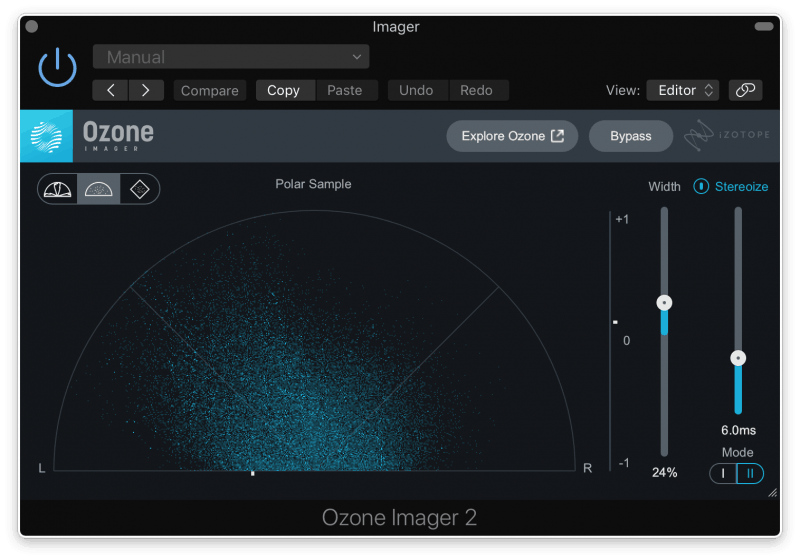
If there’s an industry-standard free widener, this is it. The iZotope Ozone Imager 2 is slick, powerful, and gives you incredible visual feedback, which is crucial when you’re messing with stereo information.
What Makes It Great:
The real power here is the feedback. The Vectorscope and Correlation Meter aren’t just fancy light shows; they tell you exactly what’s happening with your stereo image. A correlation meter that stays positive (between 0 and +1) means your track will likely sound fine in mono. If it drops into the negative, you’re in the phase-danger-zone.
How Metal Producers Can Use It:
- Widen a Guitar Bus (Carefully): Got your quad-tracked rhythms panned hard left and right? Awesome. Send them to a stereo bus and put Ozone Imager on it. Add just a hair of width to give them a little extra push to the sides. A value of +20 to +40 is often plenty.
- Use the Stereoize Mode on Synths/Pads: The “Stereoize” mode can create artificial stereo width from a mono signal. DO NOT put this on your kick, bass, or main snare. But for a mono synth pad or a string layer in the background? It’s perfect for giving those elements their own space without cluttering the center of the mix.
Polyverse Music Wider
Created by the legends from Infected Mushroom, Wider is the definition of “deceptively simple.” It’s literally one knob. You can’t mess it up.
What Makes It Great:
Wider’s whole gimmick is that it’s designed to be 100% mono-compatible. The algorithm it uses creates a psychoacoustic sense of width that completely cancels itself out when the signal is summed to mono. This means you can get some serious width without the fear of your guitars disappearing on a laptop speaker.
How Metal Producers Can Use It:
- Backing Vocals & Gangs: Perfect for spreading out those layered gang vocals without having them fight your main vocal in the center.
- Lead Guitar Effects: Instead of putting it on the lead guitar track itself, try putting Wider on your delay or reverb send. This will make the effect feel huge and atmospheric, while the core lead tone remains solid and centered.

FLUX:: Stereo Tool v3
While most people think of wideners as creative tools, FLUX:: Stereo Tool v3 is more like a high-precision diagnostic tool that just so happens to be free. This is for the producers who want to see exactly what’s happening in their mix.
What Makes It Great:
The visual analysis is second to none. The goniometer (vector scope) and phase correlation meter are incredibly accurate. If you want to understand precisely how your stereo image is behaving, this is the plugin to use.
How Metal Producers Can Use It:
- Master Bus Analysis: Slap this on your master fader as the very last plugin. Don’t even touch the width knob. Just watch it. See how your panning decisions, EQs, and compressors are affecting your overall width and phase. It’s a learning tool as much as a mixing utility.
- Corrective Adjustments: If you notice your mix is slightly leaning to one side, you can use the super-simple Pan controls to re-center it perfectly.
Don’t Forget Your DAW’s Stock Tools
You probably already have a decent stereo widener. Logic Pro has the Direction Mixer, and many stock plugins in Pro Tools, Cubase, and Reaper have width controls built-in. You can also fake a stereo effect (the Haas effect) with any stock delay plugin by panning a track center, sending it to an aux, panning that aux hard to one side, and delaying it by 15-30ms. Just be warned: this trick is a famous mono-compatibility killer, so use it with extreme caution.
How to Use Stereo Wideners The Right Way in a Metal Mix
Having the tool is one thing; knowing how to use it is everything.
It’s Not For Your Low End
This is rule number one. Keep your kick drum, sub-bass, and the fundamental low-end of your bass guitar dead center and in mono. Spreading low-frequency information creates a weak, undefined, and phasey foundation that will make your mix sound amateurish on any system.
Use on Busses, Not Every Individual Track
Instead of putting a widener on every single backing vocal track, route them all to a “Backing Vox” bus and put one widener on that. Same for your synths, or even your toms. This glues the elements together and creates a much more cohesive stereo image than having ten different widened signals fighting each other.
The Power of Parallel Processing
Here’s a pro move: create a new stereo aux track and put your stereo widener on it. Set the plugin to 100% wet. Now, send a small amount of the signal you want to widen (like a synth pad or lead guitar) to that aux track. This way, you’re blending the “super-wide” signal in with the original, preserving the integrity and punch of the dry track while adding an enhanced sense of space. It’s the best of both worlds and gives you way more control.
Check. Your. Mono. Compatibility.
We can’t say it enough. You need to be constantly checking your mix in mono. Use a utility plugin on your master bus to instantly flick your entire mix into mono. Do the guitars get thin and weak? Do the cymbals almost disappear? If so, you’ve gone too far with the widening. Dial it back.
Beyond Wideners: Building a Massive Mix from the Ground Up
A free stereo widener plugin is a fantastic utility to have in your arsenal. But if you truly want to create enormous, immersive metal mixes, you have to look at the entire process.
A wide mix isn’t about a plugin; it’s the result of hundreds of small, smart decisions about:
- Panning: The brutal, hard-panning of quad-tracked rhythm guitars is the bedrock of modern metal width.
- EQ: Carving out specific frequencies so your left and right guitars aren’t fighting each other for space, making the stereo separation feel even cleaner and wider.
- Compression: Using different attack and release times on linked vs. unlinked stereo compressors to subtly enhance the stereo field.
- Arrangement: Knowing when to leave space for things to breathe, making the wide moments hit even harder.
These are the exact kinds of high-level concepts you learn when you’re a part of Nail The Mix. You get to download the actual multi-tracks from bands like Bleed From Within, Spiritbox, and Mastodon, and watch the original producer mix the song from scratch, explaining every single decision. It’s not just about what plugins they use—it’s about why they’re making the choices that lead to a world-class mix.
Lamb Of God on Nail The Mix
Machine mixes "Redneck"
Get the Session
Grab one of the free tools above, master the concepts, and start making smarter decisions. That’s how you’ll go from chasing a wide mix to actually creating one.